
How to Change Mercedes Benz Key Fob Battery: Step-by-Step Fix
Last Updated on October 13, 2026
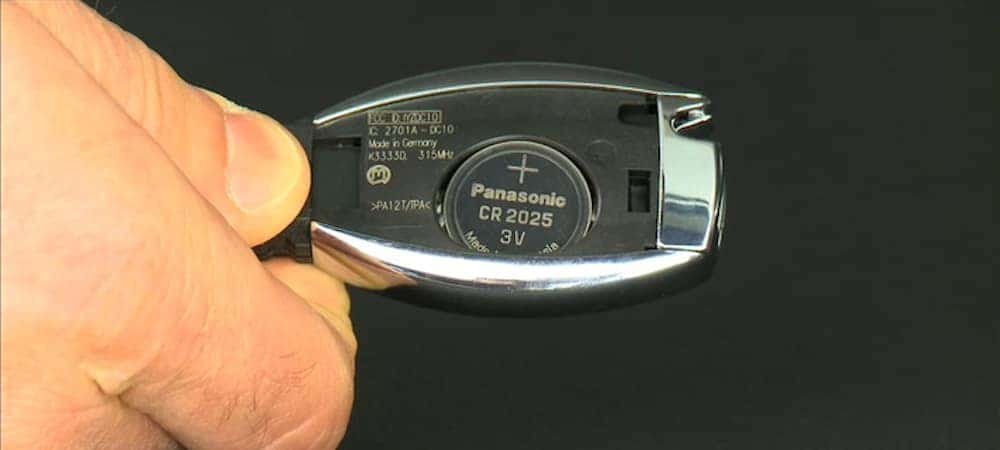
You can perform a successful how to change Mercedes Benz key fob battery replacement by sliding the release tab, removing the mechanical key, and prying open the casing to swap the old CR2025 coin cell for a new one. This task typically takes five minutes.
Tools needed to change your battery
To complete this replacement safely, gather these specific items before you begin. Using the correct battery ensures your remote signal remains strong and reliable for your vehicle.
- CR2025 lithium coin battery: This is the standard size for most modern Mercedes-Benz fobs.
- Small flat-head screwdriver: Use a precision tool to avoid scratching the plastic casing.
- Soft microfiber cloth: Lay this down to protect your car’s paint if you work near the door handle.
- Clean workspace: Ensure the area is dry to prevent moisture from entering the fob’s sensitive electronics.
If you’re unsure about your specific fob version, check the owner support manual to verify the battery type. Don’t use a CR2032 battery unless your manual explicitly lists it. The CR2032 is 0.7mm thicker than the CR2025. Forcing the thicker cell often cracks the internal plastic housing or bends the contact pins.
If the fob feels tight when closing, stop immediately. You have likely misaligned the battery or selected the wrong size. Forcing the casing shut will permanently damage the delicate internal circuit board, turning a ten-dollar repair into a three-hundred-dollar replacement. Always test the lock function from five feet away before fully snapping the housing shut.
How To Change Mercedes Benz Key Fob Battery: Step-by-Step
- Slide the small release tab on the back of the key fob to the side.
- Pull the metal mechanical key blade out of the fob housing completely.
- Insert your flat-head screwdriver into the narrow slot where the metal key was just removed.
- Twist the screwdriver gently to pop the back cover of the plastic housing off.
- Slide the old battery out of the plastic tray using your fingernail or the screwdriver tip.
- Insert the new CR2025 battery, ensuring the positive (+) side faces upward as indicated on the tray.
- Snap the back cover of the fob back into place until you hear a clear click.
- Slide the metal mechanical key back into its original position until it locks.
Tip: If the cover feels stuck, don’t force it; ensure the screwdriver is fully seated in the slot before twisting. Careful: A capacitor inside the key fob can hold a charge, so avoid touching the small internal circuit board with metal tools to prevent accidental short-circuiting.
Situational factors and effort
The time required for this process depends on the specific fob generation you own. Newer “Keyless-Go” models often have tighter seals than older flip-style keys.
| Situation | Time Required | Complexity | Key Watch Points |
|---|---|---|---|
| Standard Fob | 3-5 minutes | Low | Check seal alignment |
| Chrome-Edge Fob | 5-8 minutes | Moderate | Avoid scratching edges |
| Older Flip Key | 3 minutes | Low | Watch the spring tension |
It’s always safer to start with light pressure when prying the casing. If the cover doesn’t budge, re-check that the mechanical key is fully removed before applying more force to avoid cracking the plastic.
The most common mistake is assuming the casing snaps open like a remote control battery cover. If you feel significant resistance, stop immediately. You’re likely missing a hidden set screw tucked inside the mechanical key slot.
Forcing it now will snap the internal locking tabs. If the tabs break, the fob will no longer sit flush, leading to moisture ingress that eventually kills the circuit board.
Verifying your work
A successful battery change results in the LED light on the fob blinking once when you press a button. If the light doesn’t flash, the battery may be seated upside down or the contact points inside the fob may be dirty.
You can gently clean these contacts with a cotton swab and a tiny drop of high-percentage isopropyl alcohol. Avoid using water or household cleaners, as the residue can corrode the delicate circuit board.
If the fob still fails to lock or unlock the car, the issue might be a desynchronized signal.
In this case, you must follow the pairing procedure in your owner’s manual. If you have two fobs, test the second one. If the second works but the first does not, the internal transmitter is likely broken and requires a professional replacement.
Standards and maintenance rules
Mercedes-Benz recommends using high-quality lithium batteries to prevent leakage, which can destroy the internal electronics. According to the manufacturer, these fobs operate on a low-power frequency that’s sensitive to voltage drops.
If your fob light blinks red or the range drops below five feet, the voltage has already dipped below the operational threshold. Don’t wait for a complete failure. Replace the cell immediately to avoid a total system lockout.
Dispose of your old lithium coin cells at a designated battery recycling center rather than the regular trash. These cells are a significant fire hazard if crushed in a waste compactor.
Replacing the battery regularly is a good standard practice. Cold temperatures accelerate internal resistance, which causes the battery to die prematurely.
Mercedes Benz, in short
Once the back cover snaps securely into place, test the buttons to ensure your car responds instantly. If the locks don’t react, double-check that the battery is facing the right way. You’ll be back on the road in no time, and it’s a great feeling to handle these small repairs yourself.
Related guides